Part of a series on building a real working relationship with Claude. Last time: the boot camp, the Personal DNA file, the voice skill, and the moment I had five different projects with five different memories and no way to move between them. This one is about what happened when I stopped chatting and started building.
I did not set out to build an AI Command Center. I was trying to fix an automation for Pet Companions Bed & Biscuit, the dog care business my wife Laurel and I own.
I had spent most of a weekend building the workflow in Make.com. The canvas was full of modules, each one a small black box with its own quirks, wired together with logic I could see but not really read. By Sunday night I had something that almost worked and a list of failure modes I didn't understand.
My son Matthew looked at what I was doing and said something like, it's so much easier to write and debug the code you need for these automations in Claude Code than it is in Make.com.
He was right, and not by a little. I rebuilt the workflow in a few hours. The logic wasn't simpler. I could finally see it. Real code, real error messages, a specific place to fix what broke instead of clicking through a chain of modules hoping the fourth one wasn't the problem.
That weekend got me into Claude Code. What happened next changed how I thought about AI.
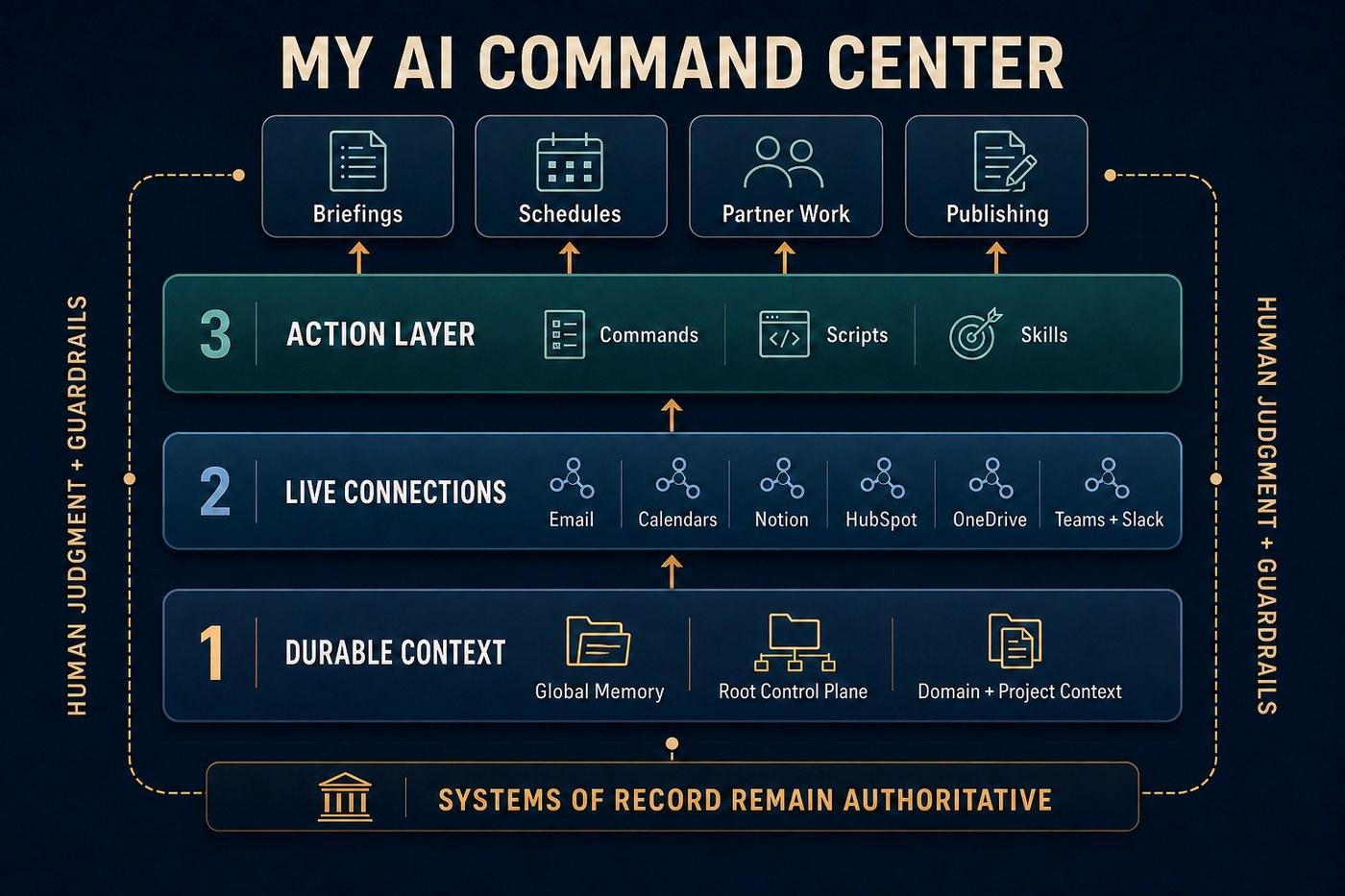
Writing code faster turned out to be the small win. The bigger one was giving Claude three things a chat window never had: context that survives the conversation, access to the systems where my work lives, and repeatable ways to act on what it knows. Those three layers became what I now call my AI Command Center. Each one took its own set of mistakes to get right.
Context that survives the chat
My first setup had five separate Claude projects, each one smart inside its own walls. The moment one needed something another knew, I was back to copying context between chats and downloading files from one project to upload into another.
Claude Code gave me a filesystem. That sounds like a technical distinction. It became an organizational one.
I created one root folder called Claude, then a subfolder for each part of my life:
skan/for my role leading the partner ecosystem at Skan AIpcbb/for Pet Companions Bed & Biscuitbw-family/for family matterserik/for career development, writing, and fitnessebrittwebb.com/for my personal website
These weren't separate AI personalities. They were rooms in the same house.
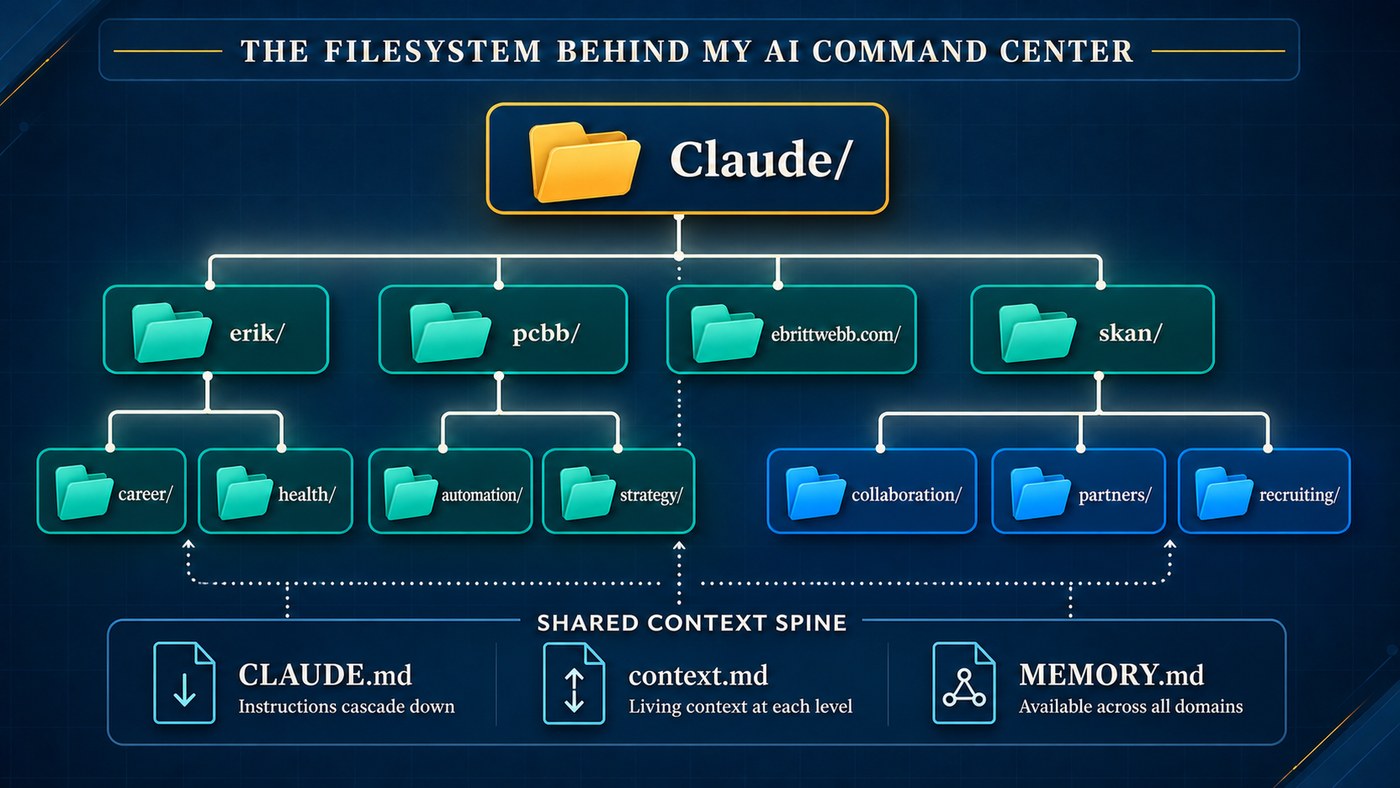
Each room holds three kinds of information, and it took me a while to see the difference.
Instructions live in a CLAUDE.md file at the top of each folder, and they're mechanical. Where finished work gets saved, what counts as a partner folder versus a workstream folder, naming conventions. Write it once and it barely changes.
Context lives in a context.md beside it, and it's the one that earns its keep. It's the living narrative for a single piece of work: the people involved, the current state, the decisions already made, the open questions. It should be paste-able. Hand it to a teammate, or drop it into a fresh conversation, and they're oriented in one read.
Memory carries the smaller set of facts and preferences that should follow me everywhere, no matter what I'm working on. It shouldn't hold project detail. It should hold a pointer and a reason.
The pattern goes as deep as the work needs. At Skan, each partner (Wipro, IBM, PwC, HCLTech, Brillio, and others) gets its own folder with its own instructions and context. Wipro grew complex enough to split again, into workstreams for banking, partner enablement, a major internal sale, product integration, executive relationships, marketing, and a customer symposium in Australia.
I confused those three for a while. I put project history into global memory. I duplicated facts across summary files. Then one copy changed and another didn't.
The audit that followed was humbling. I found a summary file still confidently describing a structure I'd replaced weeks earlier, while the real work underneath it had moved on. The AI had context. Some of it was just stale.
The fix was one home for each kind of information. The system is alive, and living systems drift. Now the drift is visible, and I can correct a file once instead of rediscovering the same problem across five unrelated chats.
Connecting AI to the work itself
Persistent context made Claude more informed. It didn't make it operational.
My work doesn't live in one folder. Tasks live in Notion and HubSpot. Meetings live in Outlook and Google Calendar. Conversations happen in Teams, Slack, and email. Finished Skan deliverables belong in OneDrive. Pet Companions runs through Notion, When I Work, Gmail, Google Sheets, Slack, and Kennel Connection. A chat window only knows what I remember to paste into it. The Command Center started becoming useful the moment Claude could reach those systems directly.
Building the connections wasn't smooth. A calendar connector worked fine for three calls in a row, then failed on the fourth with no warning. A fallback I'd built for that scenario had itself silently expired between sessions. Neither failure was serious, but both would have stayed invisible if I hadn't been paying attention. Both are documented now, in plain language, so the next run expects them instead of assuming everything's fine.
The local files aren't the systems of record. HubSpot remains the source for Skan deals, companies, and contacts. OneDrive remains the home for finished company deliverables. The files give Claude enough durable context to work across those systems without me explaining the relationship from scratch every time.
That boundary matters. AI gathers, reconciles, prepares, drafts, and surfaces decisions. Human approval stays where it belongs. A team schedule can be generated, but it's previewed before anything is written. A contact sync reports conflicts instead of overwriting good data. A partner briefing can pull together weeks of meetings and correspondence, but I still decide what gets sent.
The best automations remove hunting, copying, formatting, and re-explaining. They don't remove judgment.
Repeatable ways to act
Context and connections made Claude informed and connected. I was still the one starting most tasks.
The boot camp had left me with two scheduled tasks and a skill I could never get working in Claude chat. Everything else began the same way: open a new conversation, explain what I needed, point Claude at the folders and systems that mattered, and ask for roughly what I'd asked for the day before. The results were good. I was rebuilding them from scratch every time.
Claude Code changed that, and Pet Companions moved first. The Make.com fix that started all of this was the first piece of the third layer. Today, every morning, automation pulls the dog roster, staff schedule, and open tasks, and produces the daily dog-handling pages and management standup. No one has to ask for it.
That's the third layer: commands, scripts, and skills that give Claude defined ways to act on what it knows. Each one carries the steps to follow, the rules that matter, where the output belongs, and where I need to approve something before it goes further.
Today the Command Center spans more than 100 Markdown files across my work and personal life. More files can create confusion as easily as clarity. What makes these useful is that Claude can walk into a piece of work and understand the system around it. It can see that Pet Companions is both a working dog care business and the proving ground for a larger PetBizOS idea. It can see that my website, career writing, and voice belong to the same personal domain.
I still use Claude as a writing partner, researcher, and coding assistant. I no longer think of it primarily as a chat. It's becoming an operating environment around my work.
The next step was teaching that environment to stop waiting for me to ask.
Next time: how repeated requests became reusable skills, starting with a daily briefing that sets the agenda for my day before my inbox does.