Part of a series on building a real working relationship with Claude. Last time: the three layers of my AI Command Center, and the realization that I was still asking for the same things every morning. This one is about teaching it to stop waiting for me to ask.
I use one test. If I ask for the same outcome twice, I look for a way to make it repeatable. That means a command, a script, or a skill, and each one carries more judgment than the last.
Commands are fixed jobs, saved once and invoked by name. When I finish a post, /sync-to-ebrittwebb publishes it to this site. Scripts take over when the logic gets too specific for written instructions, so it becomes code. That command runs one. Skills carry judgment: they decide which steps apply, gather context first, and follow rules for what they find. A routine is a skill on a schedule.
Writing down the judgment
The output is the easy part to repeat. The judgment around it took the work, and it only lasts once it's written down.
Take meeting prep. My week is mostly partner calls, and not every call needs a prep page. The pre-brief skill builds one when someone outside Skan is on the invite, or when it's a recurring meeting I organize. It skips the internal syncs I only attend. When it can't tell, it skips, and I can ask.
Follow-up works the same way. The wrap-up skill drafts the email onto the meeting's Notion page and never sends it. The Status field is the task. "In progress" means drafted and waiting on me.
The daily briefing was the first skill that ran
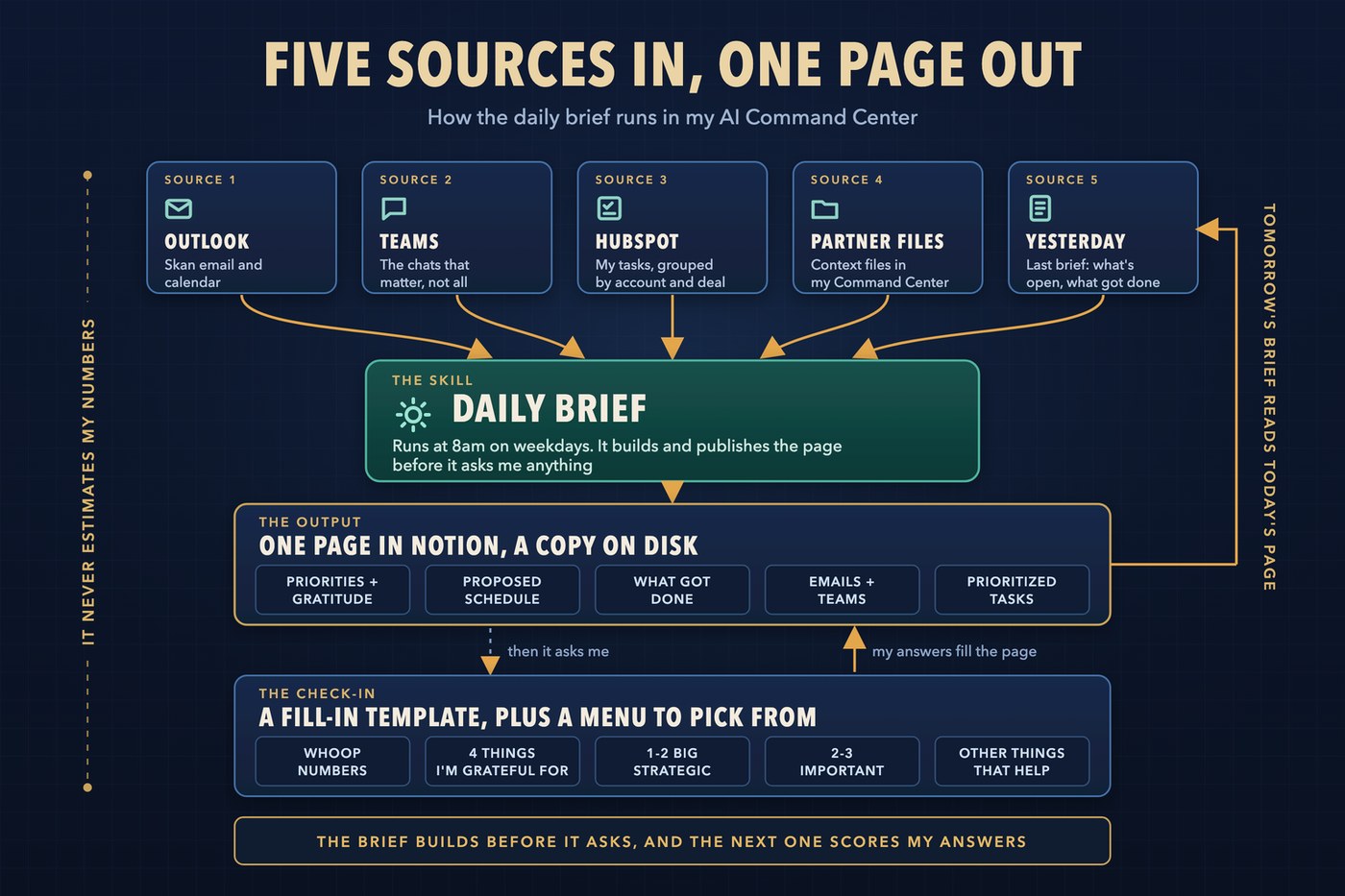
I used to start each day in my inbox. Whatever was loudest set my priorities. The brief runs at 8am on weekdays and answers three questions, in order: which emails need an answer now, which meetings need preparation, and which tasks are at risk.
It reads five places: my Skan email and calendar in Outlook, the Teams chats that matter, my HubSpot tasks grouped by account and deal, the partner files in my Command Center, and yesterday's brief, so nothing open disappears when the date changes. Partner-facing commitments outrank internal noise. Wipro gets extra weight. Newsletters, notifications, and work someone else owns stay out, because a briefing that surfaces everything has created another inbox.
The result is one page in Notion, with a markdown copy on disk. It opens with my priorities and gratitude, then a proposed schedule: my booked meetings plus a work block in each gap, each tied to a named task, with the meetings that qualify linked to their prep page. Below that come what I got done since the last brief, then the emails, Teams threads, and tasks that need me.
The brief builds and publishes before it asks me anything, so the draft is readable the moment the automated part finishes. Then it posts a fill-in template in chat: my Whoop numbers for the night, four things I'm grateful for, one or two big strategic things, two or three important things, and anything else that would make the day great. The Whoop numbers are optional, and the brief never estimates them. It checks the gratitudes against the last two weeks for repeats.
The tasks don't start from a blank page. First the brief builds a menu: what I carried over from the last week, with a count of how many days each item has waited, suggestions from HubSpot, email, and context, and four recommendations with a clause of why. At least one has to be a strategic draft whenever one is waiting, with a protected 90-minute block early in the day. I added that rule after a day when I cleared ten small items and left all three strategic drafts untouched.
My answers go back into the page. Every task becomes a checkbox under strategic, important, or other. The Whoop numbers get their own Notion page, with an analysis built only from what I gave it. Tomorrow's brief reads the checkboxes back to score the day and carries whatever I didn't tick.
On October 11 I split the brief in two. Pet Companions and my personal work moved to a separate evening brief, and the Skan brief kept the morning. The split gave each brief a name that says what it covers: erik-skan-daily-brief and erik-pcbb-daily-brief. Before that, the one brief had gone by daily-brief, daily-briefing, and erik-daily-brief.
Research, prep, and wrap-up around every call
Meeting prep began as a step inside the daily brief. Each morning Claude filed a prep page for every meeting that mattered. That depended on me running the brief on time, and a meeting two days out shouldn't wait for tomorrow's brief. So I gave prep its own schedule, and it became a routine. The first scan, on August 26, created eight prep pages for two days of partner calls.
The first version of that change created a second skill, meeting-prebrief-scan, next to meeting-pre-brief. Two names that close would blur in any task list or log line. I folded the scan back into the original as a third way to start the same work: on request, inside the daily brief, or on its own timer. One skill, three doors in, the same output.
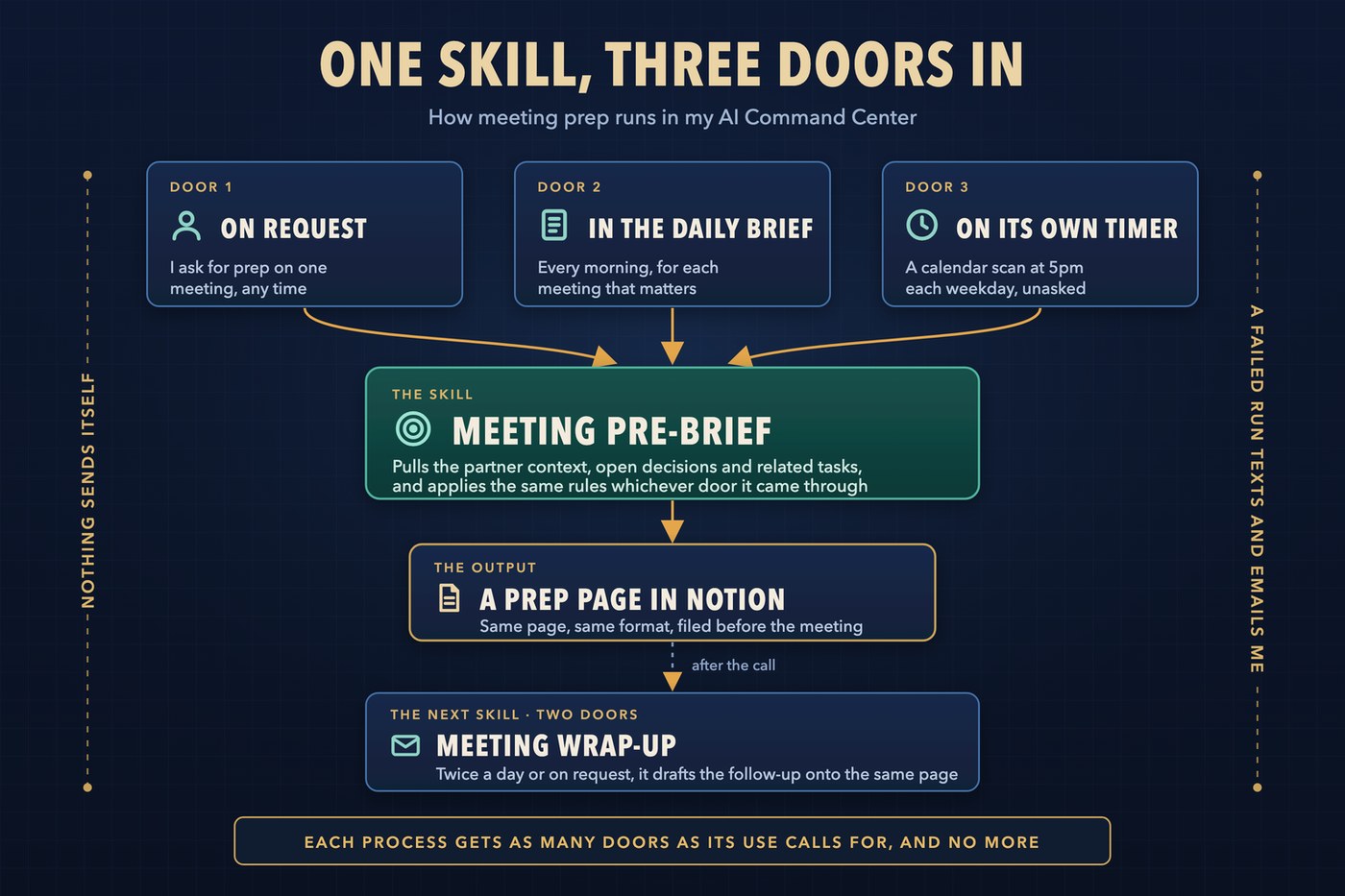
The wrap-up skill covers the other end of the call. At noon and 6pm on weekdays it looks for calls that just finished. It drafts the follow-up onto the same Notion page the prep created, then adds what it learned to my partner files and my contact list. I can also run it on demand after a call that matters. It never sends anything.
A third routine researched the partner itself. At 6pm Sunday through Thursday it checked tomorrow's calendar and researched only the partners I was about to meet. No meeting meant no report. A 14-day cooldown sent me to the existing brief instead of writing a second one. Each brief opened with a short Teams post, written as if the partner might read it. In eight weeks it researched 28 partners. I've turned it off for now. It was useful while it ran.
Together the three skills cover the three tasks I timed by hand in week two of the boot camp: researching a partner, preparing the brief, and writing the follow-up. The first drafts wait for me before I ask.
The drafts piled up faster than I sent them
Automation at this volume creates its own backlog. In about ten weeks the pre-brief scan has created about 250 prep pages, and the wrap-up skill has drafted more than 330 follow-ups. A draft is not a sent email. By September 4, 28 meetings had a draft waiting on me. By September 22 the number was 99.
The cause was friction. Sending a draft meant opening Notion, finding the page, copying the text, pasting it into a chat to revise it, and then pasting the result into Outlook. Most drafts stayed where they were.
On October 27 I built /followups. It lists the five meetings that most need a follow-up, ranked by partner tier, the seniority of the person on the other side, whether a live deal is attached, and how recent the call was. It shows one draft at a time. I revise it in the conversation and paste the final into Outlook myself.
It has its own gap. It can't see who showed up, so a demo where the outside guest cancelled still landed in the queue. I skip those when I pick.
Next time: the voice skill I started in the boot camp, how it went from a prompt to a habit, and the two weeks it went missing.